

Pieces AI is an AI-powered productivity tool that enables developers to save code snippets, organize relevant information, and manage their coding process. It lets users store, search, reuse, and read relevant code samples and information in different apps. The tool offers AI-assisted coding, contextual search, code snippet management, and development environment integration. Pieces includes long-term memory features that let users access information from previous work sessions. Pieces can help students, programmers, and software development teams to become more productive, work more efficiently, and stay organized with their coding.
What Is Pieces AI?
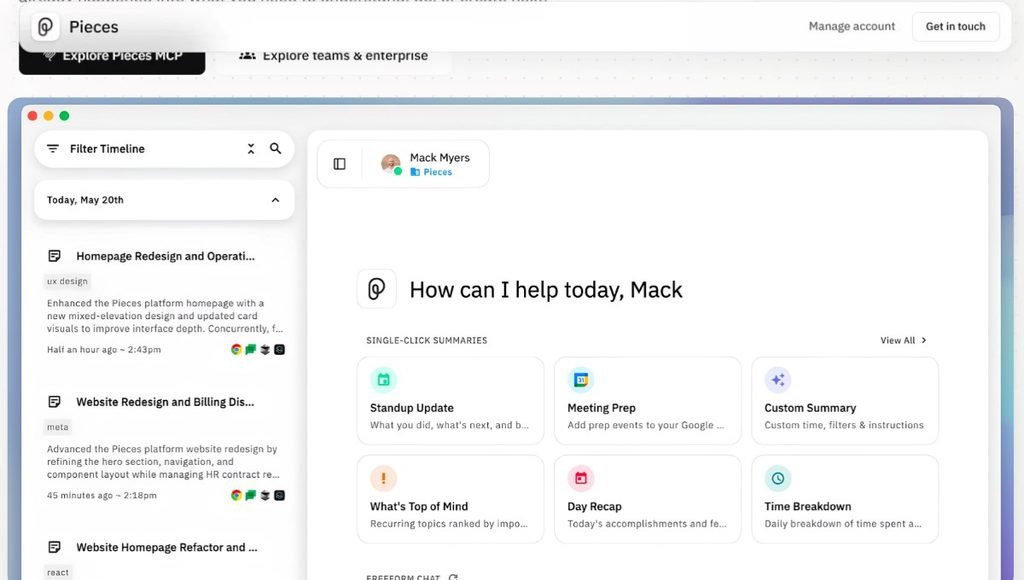
Pieces AI is an AI-powered productivity platform that lets developers control information, manage context, and save time. Instead of searching for previously used code, solutions, notes, or technical references, users can store and retrieve relevant data with this tool.
The tool not only manages code snippets but also has long-term memory features that can capture and organize work context. Its integrations help to connect information with AI-assisted coding and development environments. Pieces can be helpful to developers who work across coding editors, browsers, documentation, and AI assistants. Unlike an AI coding assistant that helps to write or modify code, Pieces also stores and retrieves information that was captured from previous work sessions.
Key Features of Pieces AI
AI-Powered Code Assistance
Pieces AI helps developers to understand, update, and improve code with the assistance of AI. Programmers can ask questions about the selected code, receive explanations, get code comments, and investigate potential errors. Such features are especially helpful for learning new programming concepts or understanding existing code written by others.
Intelligent Code Snippet Management
Pieces lets developers save code snippets for later use and manage them with AI assistance. Instead of rewriting the same lines of code or searching for solutions online, programmers can store and reuse useful code samples. Developers can also benefit from AI-generated titles, tags, and descriptions to store and find relevant code snippets easily.
Long-Term Memory
The Long-Term Memory feature helps Pieces capture and organize information from previous sessions. The app lets users search past activities, revisit technical information, and access previously saved context. Such context can include code, documentation, websites, and other relevant information captured by this tool. Developers can use this feature to quickly find relevant coding solutions or return to their work from previous sessions.
Conversational Search
Conversational Search helps users retrieve relevant information by asking natural language questions. Instead of searching through multiple web pages and documents for relevant information, developers can use this feature to ask specific questions. The answers depend on the captured information and the selected Conversational Search configuration.
Integration with AI Tools
Pieces can be integrated with AI assistants and development environments with the Model Context Protocol (MCP). The tool has native support for Cursor, GitHub Copilot, Claude Desktop, and other apps. Such integrations let users benefit from Pieces features in AI-assisted coding apps. Developers can use Pieces memory in their coding process when using the supported apps.
Workflow Timeline and Summaries
Pieces Desktop includes a timeline feature that helps users go through their captured work context. The app also has a summary feature that creates summaries of the captured information. Developers can use such tools to continue working on their projects and prepare meaningful work summaries. Having a quick overview of the coding progress can help to continue working on a task seamlessly.
Privacy and Data Controls
Pieces provides users with tools to control and protect their data in this app. The Long-Term Memory feature can be turned off, and users can manage which applications can share data with this tool. Developers can also disable memory capture or delete stored data. The memory engine uses on-device machine learning, but some AI features might involve cloud-based models. All users should review their privacy controls and ensure sensitive information is protected in accordance with their data protection policies.
How to Use Pieces AI: Step-by-Step Guide
- Step 1: Visit the Official Website. Start by visiting the official website of Pieces AI and explore the available desktop application and setup instructions.
- Step 2: Download and Install the Pieces App. Download and install the application for your operating system, and follow the installation instructions. PiecesOS is the background service that runs the desktop application and its features.
- Step 3: Open Pieces Desktop. Open the application and complete the account or initial setup instructions.
- Step 4: Configure Your Long-Term Memory. Open the app settings and look for the Long-Term Memory section. Enable the memory engine to let Pieces capture and organize your code context if you want to use this feature. Make sure to review your application permissions and only allow Pieces to access non-sensitive apps.
- Step 5: Connect Your Development Tools. Open the MCP settings and follow the connection instructions for your preferred assistant. Make sure PiecesOS is running before attempting to use the integration.
- Step 6: Start Coding and Save Information. Continue working on your project and let Pieces save useful code snippets, collect relevant information, and build your searchable memory.
- Step 7: Search Your Previous Work. Open Pieces Desktop and use the conversational search to ask questions about your previous work.
- Step 8: Review and Manage Your Data. Make sure to review your stored information regularly. You can also manage your applications and memory data with the available settings.
Pieces AI Pricing in 2026
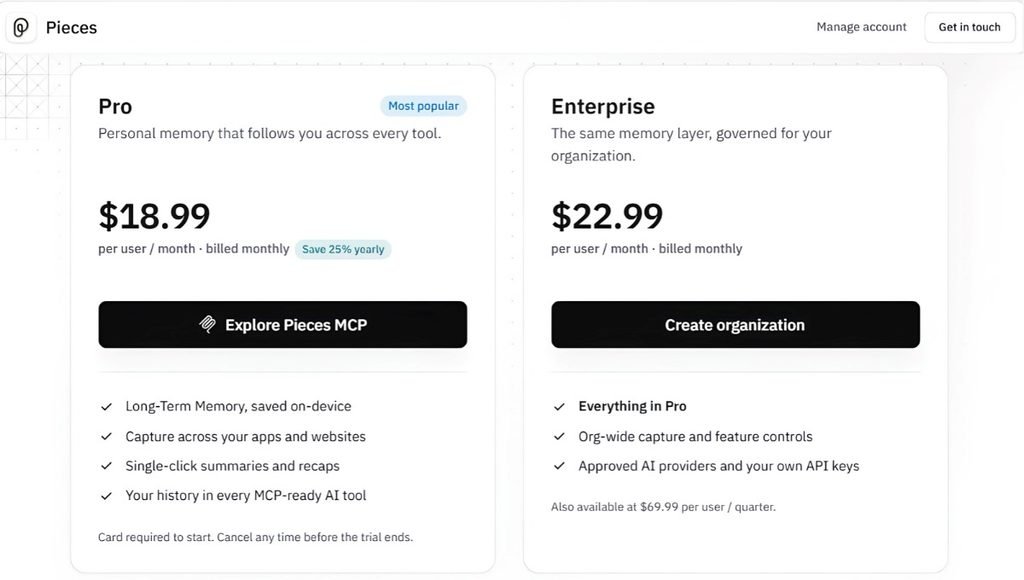
Pieces now positions itself as a long-term memory layer for your work. It captures context across your apps and websites, stores it on-device, and makes it available to any AI tool that supports MCP. It has two paid plans: Pro for individuals and Enterprise for organizations.
Pieces Pricing at a Glance
| Plan | Monthly | Quarterly | Annual |
|---|---|---|---|
| Pro | $18.99 per user/month | n/a | $169.99 per user/year (was $227.88) |
| Enterprise | $22.99 per user/month | $69.99 per user/quarter | $275.88 per user/year |
Pieces Pro: $18.99/month
Pro is marked “Most popular” and is described as personal memory that follows you across every tool. It includes:
- Long-Term Memory, saved on-device
- Capture across your apps and websites
- Single-click summaries and recaps
- Your history in every MCP-ready AI tool
Billing is monthly at $18.99. Paying yearly costs $169.99 instead of $227.88, a 25% saving that works out to about $14.17 a month.
Pieces Enterprise: $22.99/user/month
Enterprise gives you the same memory layer, governed for your organization. It includes everything in Pro, plus:
- Org-wide capture and feature controls
- Approved AI providers and your own API keys
It costs $22.99 per user per month on monthly billing, or $275.88 per user per year on annual billing. That is simply 12 times the monthly price, so unlike Pro, the annual plan shows no discount. A quarterly option is also listed at $69.99 per user. That is slightly more than three monthly payments ($68.97), so quarterly billing doesn’t save anything.
Free Trial and Cancellation
A card is required to start, and you can cancel any time before the trial ends. The screenshots don’t show the trial length, so check the live page before stating one.
Which Plan Should You Choose?
- Solo users and freelancers: Pro on annual billing is the cheapest way in.
- Teams: Enterprise adds central controls, approved AI providers, and bring-your-own API keys.
Bottom Line
Pro is $18.99 a month, or $169.99 a year. Enterprise is $22.99 a month. Pricing can change, so confirm on pieces.app/pricing before publishing.
Note: You should always double-check what the price for a subscription would be at the time of purchase.
Who Should Use Pieces AI?
Students and Beginners
Students learning to code can make use of Pieces to store and categorize code snippets that can be reused, reference old solutions and research, and get advice on reading unfamiliar code. This could be useful in particular for learning Python, Java, C++, data structures, and machine learning. For coding students, the value proposition is found in searching through useful code examples, but they should also learn to write their own code from scratch rather than relying on what has already been written by others.
Software Developers
Developers can use Pieces to find functions they have already implemented, research recurring errors, and keep track of their coding context. A memory utility might prove particularly valuable if a developer switches between repositories, browsers, and development tools constantly throughout the day.
AI and Machine Learning Engineers
AI and machine learning engineers might make use of this tool when working with datasets, conducting experiments, applying preprocessing techniques, defining model configurations, and researching debugging solutions. They can store and retrieve snippets of code that can be reused, as well as information from past studies.
It can be used alongside other tools such as Jupyter Notebook, VS Code, and AI assistants, but a dedicated experiment-tracking system would be more useful for this particular professional group.
Freelancers and Independent Developers
Independent coding professionals who work with multiple clients can benefit from being able to keep track of technical information pertaining to all of their work and reference old solutions. This can save them time that would otherwise be spent researching something that has already been done.
This could be useful, for instance, when returning to a project that has been paused or when switching between programming languages and development environments.
Development Teams
Development teams can make use of pieces of code, technical knowledge, and context utilities, as well as enterprise-level administrative and organizational tools. Whether they would find the suite of products valuable depends on how much they rely on existing code, collaborate with others, and utilize various development tools, programming languages, and frameworks, and how high their security needs are.
Pros and Cons of Pieces AI
| Pros | Cons |
| Helps organize and retrieve reusable code | Requires time to configure and learn |
| Provides AI-assisted code explanations | AI-generated answers may contain errors |
| Helps retrieve information from previous work | Results depend on available captured context |
| Supports integrations with compatible AI tools | Integrations may require additional setup |
| Provides controls for managing captured data | Users must review privacy permissions carefully |
| Useful for students and professional developers | Paid features may not suit every budget |
| Helps reduce repetitive searches | Does not replace debugging and testing |
Conclusion
Pieces AI is a great productivity tool that helps programmers save code snippets, find information about their past work, and combine their context with AI assistants. However, this technology is not intended to replace fundamental coding experience, debugging practices, and proper development procedures.
Pieces AI has various functions and tools for managing code, searching for information, and working with the application. The tool differs from traditional coding platforms with its Long-Term Memory, Conversational Search, and MCP integrations. For academic purposes, Pieces AI is helpful for practicing programming and developing coding projects. For professionals, the tool is convenient for automating repetitive tasks and finding relevant information.
FAQs
A1. Pieces AI is a programming productivity tool that allows developers to store code snippets, search for information about their past projects, explore technical details, and combine their context with AI assistants.
A2. Pieces AI offers paid subscriptions; thus, individuals interested in the service should learn about the available plans and promotions.
A3. Yes, because the tool helps users organize their code examples, learn programming information, and retrieve past coding instructions.
A4. Pieces AI is applicable for developing coding projects in VS Code and is compatible with editing software with AI plugins. However, users should learn about the latest features and file transfer instructions because the extension may be discontinued.
A5. Pieces AI is helpful for programming tasks because users can store data locally and set privacy permissions. However, prior to storing personal data, it is essential to review application-specific safety guidelines and cloud processing regulations.
Also Read: Clipdrop AI: Complete Guide, Features, Pricing, Review, and Uses