

Kimi AI is an artificial intelligence (AI) platform developed by Moonshot AI for conversations, research, coding, document processing, presentations, spreadsheets, and complex AI-assisted tasks. It has evolved from a chatbot into a broader AI workspace that combines regular chat with AI Agent capabilities and productivity tools.
In 2026, Kimi provides models including K2.6 and K3, with K3 being its flagship model. Kimi also offers K3 Cluster for large-scale search and batch-processing capabilities. Its ecosystem includes Kimi Agent, Agent Swarm, Kimi Code, Kimi Work, Kimi Claw, Deep Research and scheduled tasks. This article includes complete information about Kimi AI, including its major features.
What is Kimi AI?

Kimi AI is an AI assistant and agent platform developed by Moonshot AI. It can understand natural-language instructions and assist users with writing, research, coding, analysis, document processing, and other knowledge-based tasks.
Kimi is available through web and mobile applications. Users can ask general questions through chat or take advantage of Agent capabilities if a task requires multiple steps. The platform can also work with files such as Word documents, PDFs, Excel spreadsheets and PowerPoint presentations through supported workflows. K3 can generate editable document formats such as PPTX, DOCX, and XLSX. Kimi is useful for students, programmers, researchers, professionals, content creators, and businesses. Its Agent capabilities make it particularly valuable for tasks that require planning, research, and multiple connected actions.
Key Features of Kimi AI
Kimi AI Chat
Kimi provides a standard AI chat experience for questions, writing, brainstorming, explanations, coding, and general tasks. Users can interact with Kimi using natural language without having to learn its complex commands. The assistant can generate explanations, summaries, ideas, drafts, and structured responses.
Kimi Chat can be used for simple questions as well as more complex academic, professional, and technical tasks.
Kimi K3 and Long-Context AI
K3 is Kimi’s flagship AI model. Moonshot AI announced the launch of K3 in July 2026, claiming it as a model with 2.8 trillion parameters, native vision capabilities, and a 1-million-token context window. The large context window is valuable when working with lengthy documents, large codebases, and complex knowledge-work tasks. K3 is designed for reasoning, coding, and long-running tasks that require the AI to process substantial amounts of information.
Kimi Agent
Kimi Agent is designed for tasks that require multiple steps rather than a simple question-and-answer response.
The Agent can plan tasks, use tools, conduct research, process files, and produce final deliverables. It can be used for research, presentations, document processing, spreadsheet work, and website creation. Instead of asking Kimi separately to research a company, analyze its competitors, and create a presentation, for instance, users can state the general objective and let the Agent coordinate the workflow. Longer Agent tasks can run asynchronously, allowing the system to continue processing while the user waits for the result.
Agent Swarm
Agent Swarm is one of Kimi’s advanced features. It enables Kimi to divide a complex task among multiple AI subagents and work on different parts simultaneously. Kimi claims that its K3-powered Agent Swarm can coordinate up to 300 subagent instances and execute more than 4,000 tool calls within a single task. This capability benefits large-scale research, batch processing, and other projects that divide a large task into many independent subtasks.
A user could ask Kimi to research many companies and compare their products, for instance. Multiple subagents can work on different companies before the primary agent combines the information into a final result.
Deep Research
Kimi provides Deep Research for comprehensive research tasks. Rather than simply providing an answer based on the model’s knowledge, research tasks can perform research and organize the information into a coherent response. Deep Research can be helpful for market research, academic research, competitive analysis, technology research, and business planning. However, it is important to fact-check information, especially for academic, financial, legal, or professional research.
Kimi Code
Kimi Code is Kimi’s coding assistant, which is available as both a command-line interface and VS Code extension. It is designed to help developers write, understand, edit, and maintain software. Kimi Code can interact with code repositories, edit files, and run commands as part of a developer’s workflow. K3 is the main model for coding tasks, but other models can be used for specific coding-related requests. The long context capability can be particularly useful for developers who want an AI assistant that can understand large codebases with complex relationships between files.
Documents, PPT, Sheets, and Website Creation
In addition to basic chat requests, Kimi can help with a variety of productivity tasks. The Agent feature creates documents, designs presentations, processes spreadsheets, and develops websites. K3 can generate fully editable files in PPTX, DOCX, and XLSX formats, so users can create polished documents and presentations rather than receiving plain text responses. Websites can also be created and published with the help of Kimi’s website creation tools. These features can be particularly useful for students, businesses, researchers, and professionals who need to create complete documents and presentations.
How to Use Kimi AI
- Open the Kimi AI Site: Begin by opening Kimi and creating an account or logging in to an existing account. Some features may be available in specific regions depending on the account type and subscription level.
- Start Chatting with Kimi: After logging in, a chat window will appear. Begin by asking a question or stating a request. Most basic questions can be asked in a chat window. However, more complex requests may benefit from using the Agent feature, described below.
- Choosing a Model: Kimi offers several models to choose from. K2.6 is best suited for quick chats, while K3 is more powerful and better for complex queries and Agent tasks. K3 Cluster is a larger-scale model that is best for intensive tasks such as long-context research and batch processing.
- Writing the Prompt: Create a prompt by describing a task or asking a question. A good prompt should be specific and describe what the user is looking for. For example, a prompt might be, “Research the Indian AI industry, including a list of major companies, a comparison of their products, current trends, and a business research report with tables and conclusions.”
- Using Files: If necessary, upload a file to the chat window. After uploading a file, Kimi can be asked to summarize or analyze the information in the file.
- Reviewing the Results: Next, review the results provided by Kimi. For research tasks or tasks that involve facts, double-check the information since chatbots can make errors. For other tasks, review the results to ensure that they match the prompt.
- Saving or Continuing the Work: Finally, save the results or continue working on the task. Depending on the task and the file type, Kimi can generate files or allow the user to edit the response and save it as a file.
Kimi AI Pricing in 2026
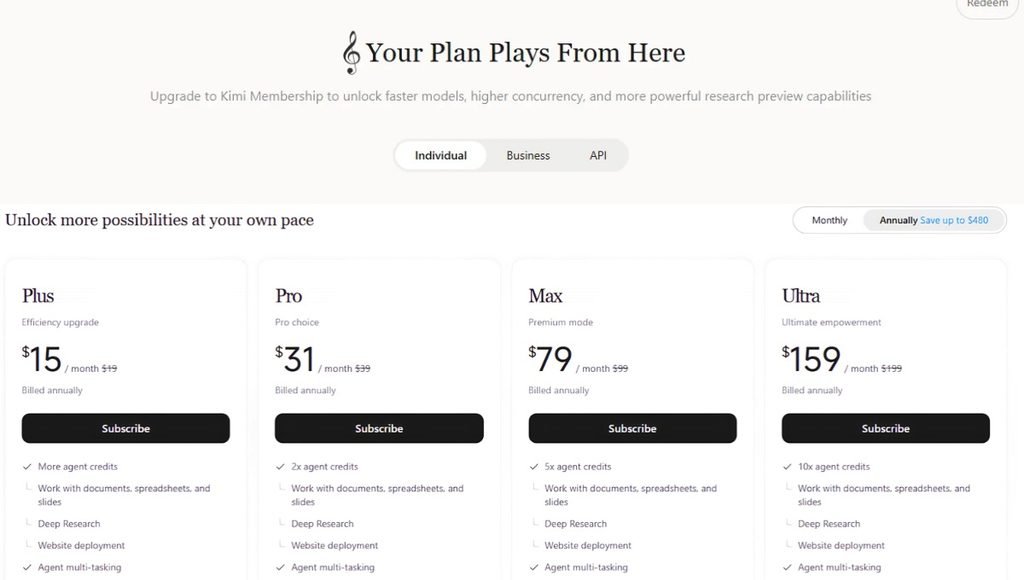
The plans range from $15/month for Plus to $159/month for Ultra when billed annually. Higher-tier plans provide more agent credits, with Plus offering more agent credits, Pro 2×, Max 5×, and Ultra 10×. All plans shown include features such as document/spreadsheet/slide support, Deep Research, website deployment, agent multitasking, and Kimi Code availability.
| Plan | Price / Month | Regular Monthly Price | Billing |
| Plus | $15 | $19 | Billed annually |
| Pro | $31 | $39 | Billed annually |
| Max | $79 | $99 | Billed annually |
| Ultra | $159 | $199 | Billed annually |
Is Kimi AI Free?
Kimi offers its AI services without requiring each user to purchase a paid membership, but advanced usage and greater limits are associated with paid membership plans. These plans offer additional credits and greater access to more advanced workflows. As Kimi uses a shared credit system, users should consider how often they use Agent, Deep Research, coding, and other credit-consuming features. Credits are refreshed based on a billing cycle and may expire at the end of the cycle if not used.
Kimi Agent and Goal Mode
Kimi’s Agent system is one of its major features. While a standard chatbot can answer a question, an Agent can work towards a bigger goal by planning, using tools, and producing a final result. For instance, instead of asking Kimi to separately research a topic, analyze the findings, and prepare a presentation, the user can give the entire objective. Goal Mode provides an even more autonomous workflow for eligible plans. It aims to help Kimi work toward the completion of a defined goal with less manual intervention.
Kimi vs ChatGPT
Kimi and ChatGPT are both general-purpose AI platforms, but their current ecosystems and product approaches differ.
| Feature | Kimi | ChatGPT |
| AI Chat | Yes | Yes |
| Advanced Reasoning | Yes | Yes |
| Long Context | Yes | Yes |
| Deep Research | Yes | Yes |
| AI Agents | Yes | Yes |
| Multi-Agent Workflow | Agent Swarm | Supported agent capabilities |
| Coding | Yes | Yes |
| File Analysis | Yes | Yes |
| PPT Creation | Yes | Yes |
| Spreadsheet Work | Yes | Yes |
| Website Creation | Yes | Available through supported workflows |
| Dedicated Coding Tool | Kimi Code | Supported coding workflows |
| Desktop Agent | Kimi Work | Desktop capabilities |
| Cloud Agent | Kimi Claw | Supported agent capabilities |
The best platform depends on the user’s requirements, preferred models, pricing, available features and usage limits.
Kimi vs Traditional Search Engines
Traditional search engines primarily help users find webpages and sources. Kimi can go further by processing information and producing a structured response or deliverable. For example, instead of manually searching for information about multiple companies and compiling the findings, a user can ask Kimi Agent to research the companies and organize the information. Search engines and original sources remain important for verification, especially when factual accuracy is important.
Pros and Cons of Kimi AI
| Pros | Cons |
| Strong long-context capabilities | Advanced usage consumes credits |
| Powerful Agent workflows | Complex Agent tasks can take time |
| Agent Swarm supports parallel work | Higher plans are required for advanced features |
| K3 supports very large context | AI output still requires verification |
| Strong coding capabilities | Coding usage has limits |
| Deep Research | Research results should be checked |
| Document and office-file support | Features can change frequently |
| Kimi Code for developers | Subscription structure can be complex |
| Kimi Work and Kimi Claw | Some features are plan-dependent |
Who Should Use Kimi AI?
- Students: Kimi can assist students in research, study notes, explanations, coding, document analysis, and presentations.
- Researchers: Researchers can leverage Kimi for long-document analysis, Deep Research, and information organization.
- Programmers: Developers can utilize Kimi and Kimi Code for coding, debugging, codebase analysis, and software development.
- Content Creators: Creators can use Kimi for research, scripts, articles, ideas, and content planning.
- Business Professionals: Professionals can leverage Kimi for reports, presentations, spreadsheets, research, and automation.
- Entrepreneurs: Entrepreneurs can leverage Kimi for market research, competitor analysis, business planning, and website projects.
Conclusion
Kimi AI has evolved into a comprehensive AI workspace as opposed to just a chatbot. Its current ecosystem comprises K3, K2.6, K3 Cluster, Kimi Agent, Agent Swarm, Deep Research, Kimi Code, Kimi Work, and Kimi Claw. Agent Swarm is another key capability that allows complex tasks to be split across multiple AI subagents and processed in parallel, which is appropriate for large-scale research and batch-processing workflows.
Generally, Kimi is a particularly good fit for users requiring long-context processing, coding, research, and multi-step AI automation, including students, programmers, researchers, content creators, professionals, and businesses who can leverage its various tools for a broad range of tasks. As with other generative AI platforms, it is important for users to verify critical information and review generated results with care prior to relying on any outputs for academic, financial, legal, medical, or professional purposes.
FAQs
A1. Kimi AI is an artificial intelligence platform developed by Moonshot AI that provides chat, research, coding, document processing, Agent workflows, and other productivity features.
A2. Kimi K3 is Moonshot AI’s flagship model, which was launched in July 2026 and has a 2.8-trillion-parameter architecture, native vision, and a 1-million-token context window.
A3. Kimi Agent is an AI system designed to plan and complete multi-step tasks such as research, document processing, presentations, spreadsheets, and website creation.
A4. Agent Swarm is a multi-agent system that can split complex tasks among multiple subagents and execute them in parallel.
A5. Yes. Kimi supports coding through its main AI platform and dedicated Kimi Code tools for CLI and VS Code workflows.
Also Read: OpenArt AI: Features, Pricing, AI Image, Video, Editing, Models & Complete Guide 2026

[…] Also Read: Kimi AI: Features, Pricing, K3 Model, Agent, Deep Research, Coding & Complete Guide 2026 […]